Control your hearing aids without reaching for your phone
You are sitting at the table and want to lower the volume or switch to a listening program for a busy setting. With the Starkey Remote Control 2.0, you can do this with a physical button. There is no need to find a tiny control behind your ear or open an app first.
Straightforward everyday controls
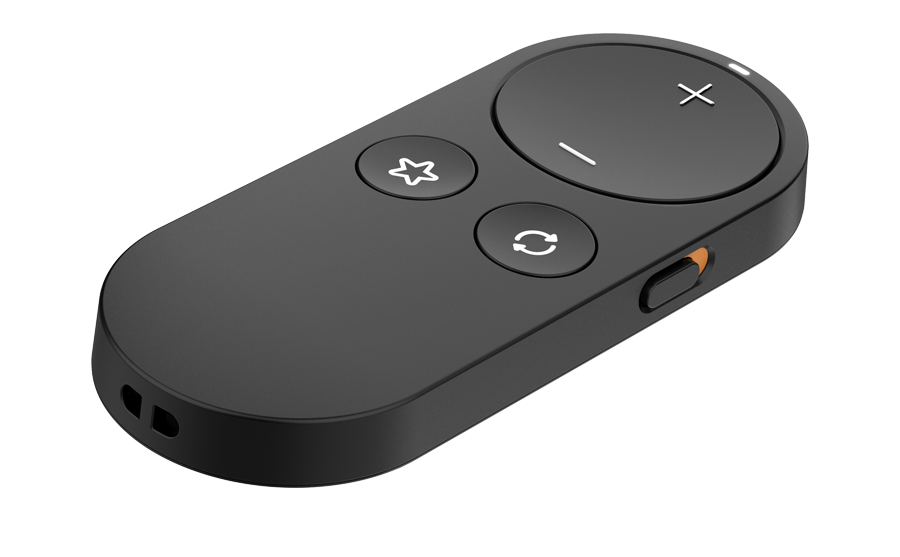
Separate buttons control volume, programs and a favourite. During audio streaming, the volume buttons adjust the stream volume. The lock switch prevents accidental changes in a pocket or bag. The included lanyard helps keep the remote within reach.
Compatible hearing aids
Wireless versions supporting StarLink Remote Control 2.0:
- Starkey Omega AI+
- Starkey Omega AI
- Starkey Edge AI
- Starkey G Series AI
- Starkey Genesis AI
- Starkey Evolv AI
Not for non-wireless NW models. Older hearing aids using SurfLink require a different remote; the Starkey brand alone does not establish compatibility.
What does the favourite button do?
Your hearing professional can assign a function or setting. Its behaviour therefore depends on your hearing-aid programming. If no favourite has been configured, the button has no effect. The remote does not transmit TV sound or conversations; audio requires a compatible streamer or microphone.
Pair once before use
Temporarily turn off Bluetooth on your phone. Turn the hearing aids off and on, place them within 15 cm of the remote and hold the favourite button for five seconds. The indicator confirms pairing. Test the volume controls and turn phone Bluetooth back on. For a CROS system, follow the separate instruction in the manual.
Specifications
- Battery: replaceable CR2032 lithium coin cell; not rechargeable
- Controls: volume, program, favourite and button lock
- Connection: 2.4 GHz Bluetooth Low Energy
- Dimensions: approximately 86 × 36 × 14 mm
- Weight: approximately 33 grams
- Colour: black
- Manufacturer item code: P00002347
What is included?
You receive one Starkey Remote Control 2.0 with a replaceable coin-cell battery and lanyard. Hearing aids and an audio streamer are not included. Keep new and used coin cells out of reach of children.
Do I need a smartphone?
No smartphone app is needed for everyday operation. The hearing aids must first be paired with the remote. Your hearing professional configures additional listening programs and the favourite function.
User manual
Remote Control 2.0 user manual (PDF, English)